
Crossings
Crossings are navigation aids that trigger a spoken announcement or on-screen message when a user’s route passes through a defined line in the space. They are used to surface contextual information at the right moment - alerting users to something in their immediate environment, or drawing attention to something nearby.
Common examples include:
- “Use the keyfob on the left to open this door.”
- “Be aware of the step ahead.”
- “You are entering a restricted area - ensure PPE is worn.”
Adding a crossing
Section titled “Adding a crossing”- In the Spaces editor, open the Navigation Aids section in the left-hand panel.
- Select Crossings.
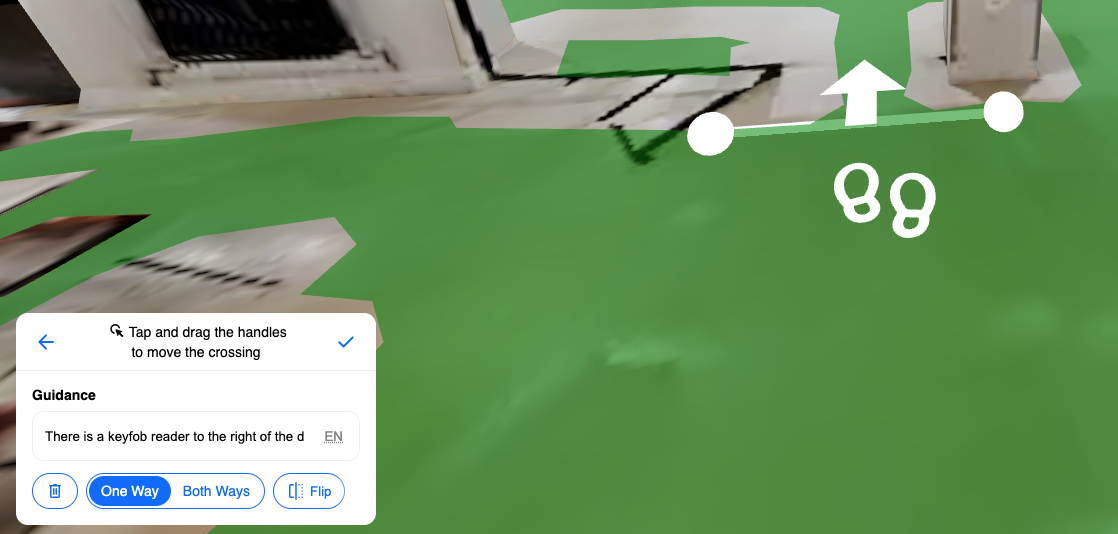
- Click to draw a crossing line across the path on the map mesh. The line defines the trigger boundary - when a user’s route crosses this line, the announcement will play.
- Fill in the message you would like the crossing to announce or display.
- Set the crossing direction:
- One-way - the announcement only triggers when users cross the line in a specific direction.
- Multi-directional - the announcement triggers regardless of which direction the user crosses the line.
When to use crossings
Section titled “When to use crossings”Crossings are most useful for:
- Providing context that is location-specific and would not be visible on a map or landmark description.
- Alerting users to hazards, access requirements, or changes in environment.
- Reinforcing instructions at key transition points such as doorways, stairwells, or zone boundaries.
Crossings are not the same as Obstacles. Obstacles prevent routing through an area, whereas crossings simply trigger an announcement when a user passes through a point on an active route.