
Accessibility
Accessibility is built into Spaces from the ground up, not added as an afterthought. Every Spaces experience delivers the same guided navigation to all users - no additional configuration, plugins, or separate accessible mode is required.
Spoken turn-by-turn instructions
Section titled “Spoken turn-by-turn instructions”When a screen reader is active on the user’s device, Spaces delivers spoken, turn-by-turn instructions throughout the journey. This makes Spaces fully usable by blind and low-vision users navigating independently, without requiring any separate accessible mode or additional setup.
Stair and step warnings
Section titled “Stair and step warnings”When a route includes stairs, Spaces will automatically announce this to the user before they reach them - indicating whether they are about to go up or down. This keeps users informed about changes in elevation along their route, supporting both safety awareness and mobility planning.
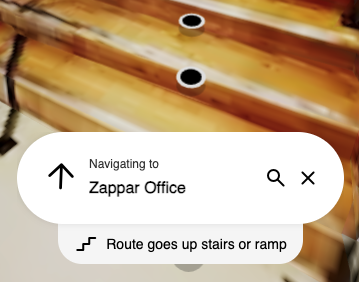
No manual configuration is needed for stair warnings. Spaces detects level changes from the map data and includes the appropriate announcements automatically.
Screen reader compatibility
Section titled “Screen reader compatibility”The Spaces interface is compatible with screen readers. Users relying on assistive technologies can interact with the experience, including searching for landmarks and receiving navigation instructions, without needing any workarounds or alternative versions.
Delivering inclusive navigation
Section titled “Delivering inclusive navigation”Because Spaces is app-free and runs in the browser, there are no installation barriers for users with assistive technologies already configured on their devices. Users can launch the experience from a QR code or link using their preferred browser and assistive setup, with no additional steps required.